


Overview:
First mod for us and the number one mod we recommend every RV owner do first to protect your new and expensive asset. Our Tiffin comes with an industry standard Transfer Switch (Surge Guard 41260) which provides minimal protection for up to 2600 joules with protection for open neutral and reverse polarity. We wanted something more robust for any connections
From the specs of the Progressive Industries EMS-HW50C, key benefits are:

- 3,580 joules protection
- Over/Under Voltage Protection
- Open Ground, Neutral, and Reverse Polarity
- Miswired Pedestal
- Accidental 240v Protection
- Time Delay (136 seconds)
- Amp Meter and Error Code Display
- Field Serviceable (replace circuit board)
- EMS Bypass Switch (standard on HW models, add-on for LCHW models)
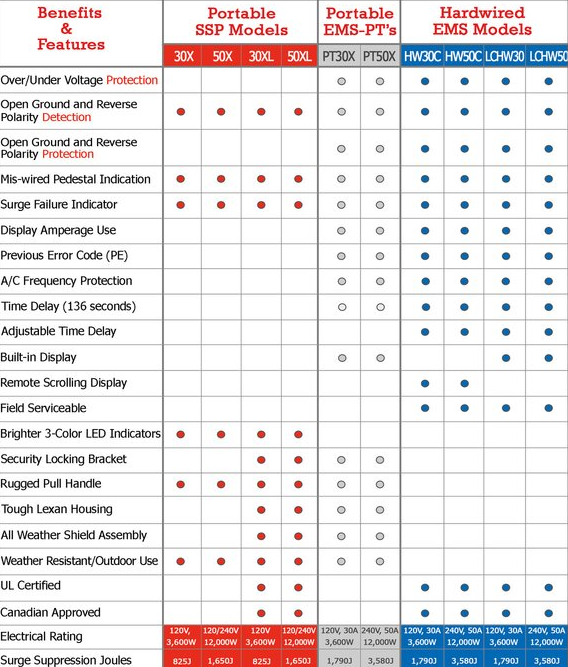
When comparing models to purchase for your RV, be sure to understand what features you get compared to a portable vs a hardwire unit and which specific set you utilize within. Progressive Industries has a good chart to understand which model can best fit your needs:
Parts List:
- EMS-HW50C – $325
- EMS-RDS – $95 (optional remote display to place indoors)
- 50-Amp 6-4 Power Cord – $20 (optional if you don’t want to cut your current RV power cord)
- Steel Cushion Clamps (optional for tidy appearance)
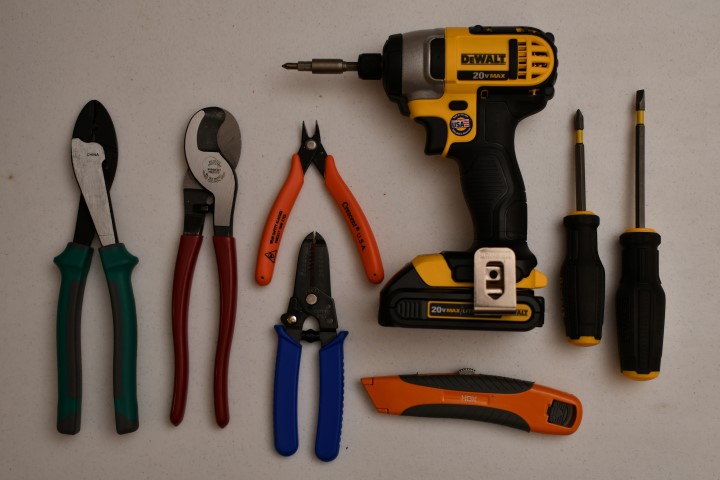
Tools Required:
Steps Involved:

- READ THE MANUAL
- Turn-off and disconnect all power sources (Pole, Generator, Inverter)
- Determine a location where you will mount the EMS.
- I put mine right under my existing transfer switch. You’ll need to determine if you have sufficient room.
- Keep in mind the 6-4 cable is unwieldy and difficult to manipulate for sharp bends
- FYI – HW50C can be mounted upside down (you can invert the cover afterwards
- If you purchased a power cord:
- Use cable cutter to remove shoreline connector
- Use cable cutter to remove eye grommets from other end
- DISCONNECT YOUR SHORE POWER
- Open your transfer box, take a picture
- Locate the terminals where your existing shore power cable connects to
- Disconnect the shore cable from the transfer box (this will go to the EMS)
- If you plan on cutting your shore cable
- DISCONNECT YOUR SHORE POWER
- Measure length needed to reach your EMS location (2-3ft)
- Use Cable Cutter to cut clean thru

- Wire up the EMS Shore-side (before you mount it)
- Strip the cut end of the shore power cord on to expose all four cables (about 6 inches)
- Strip the four leads to expose wires (about 1/4 inch)
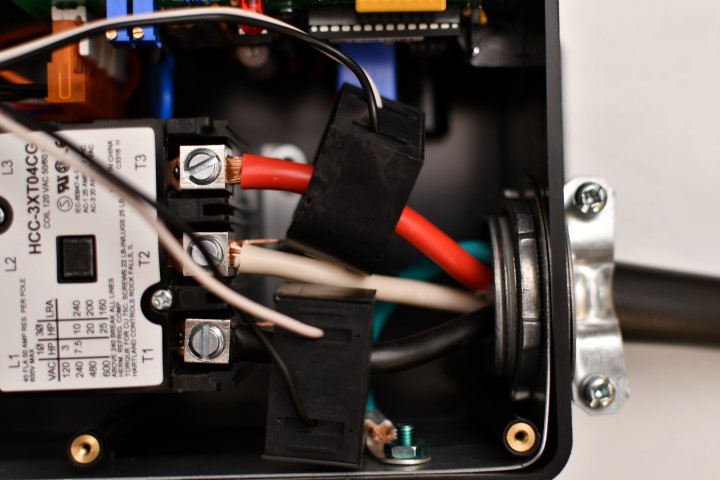
- Per the manual, connect you shore power leads to the EMS
- Wire up the EMS House-side
- On your new power cord, follow steps 6a + 6b
- Per the manual, connect that end to the EMS
- Be sure to align the power sensor collars correctly, per instructions
- Wire up the Transfer Switch
- Repeat steps 6a + 6b for the other end of the short power cord
- Wire up the transfer switch exactly as the picture you took previously
- Connect the accessory display
- Test your Setup
- Dont mount the EMS yet
- Carefully review all connections are secure and wired correctly
- Plug in your shore power and wait for the time delay
- Ensure incoming power levels. Check power throughout your coach.
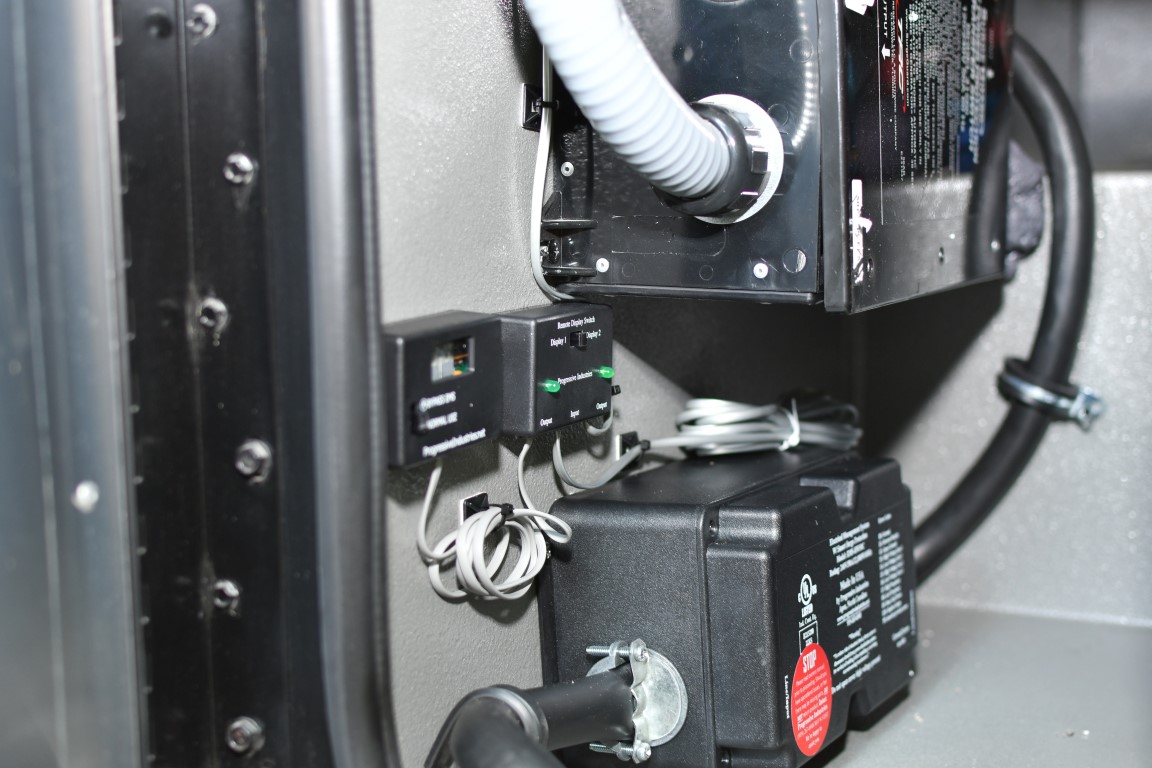
- Permanently mount your EMS and accessory display
- (Optional) Mount your additional Remote Display internal to your coach
- Identify a location for your additional remote display
- Determine the best path to route the remote display cable (be super cautious and certain where you will drill within the coach to ensure you don’t accidentally hit a coach power or service line)
- For flush mount, use Oscillating Multi-Tool to create a hole at the install location (or mount direct against the wall)
- Wire and mount your access display
The Down Low:
If you are not comfortable doing this DIY, most RV repair/sales shops will do this installation for a fee. Better yet, get this installed prior to delivery if buying a new coach.
DISCLAIMER: WARNING The topics covered on this site include activities in which there exists the potential for serious injury or death. Rogerover.com DOES NOT guarantee the accuracy or completeness of any information contained on this site. Always follow proper safety precautions and procedures and seek professional assistance as necessary before attempting any DIY project!